Is math a prerequisite for development?
People who are just getting into development often ask, "I was bad at math — can I still be a developer?" Most of the time the answer is, "You don't need math. Especially not for frontend."
I'm a frontend developer with a degree in math. Because of that, I get the opposite question a lot: "Does being good at math actually help with development?" or "I bet you crush coding tests, huh?"
Truthfully, you can absolutely get started in development without math. But once you run into more nuanced or complex problems, the story changes a bit.
While building an editor, I ran into a problem that the DOM API alone couldn't solve, and I ended up reaching for some high school math to fix it.
The problem
As I mentioned in a previous post, the editor product I was working on used a custom-drawn caret. To draw a caret yourself, you have to manually compute every property — position, width, height, blink interval, and so on.
The caret logic we'd built was working fine. Then one day, after we added the ability to rotate shapes, an unexpected issue popped up.
When a shape rotates, the text inside it rotates with it. But the caret wasn't keeping up with the rotation, and it ended up being drawn in a completely wrong spot.
At first I thought:
"Shapes rotate easily with
transform: rotate, so doing the same thing for the caret should be a piece of cake, right?"
That was a massive miscalculation...
Finding the cause
The caret rendering logic relied on getBoundingClientRect() to get the position and size of DOM elements. It would pull the text element's coordinates and size from that method, then compute the caret's position, width, height, and so on.
The trouble started with getBoundingClientRect().
getBoundingClientRect() doesn't return the "actual size" of a rotated element.
Instead, it returns the bounding rectangle (bounding box) that can contain the rotated element.
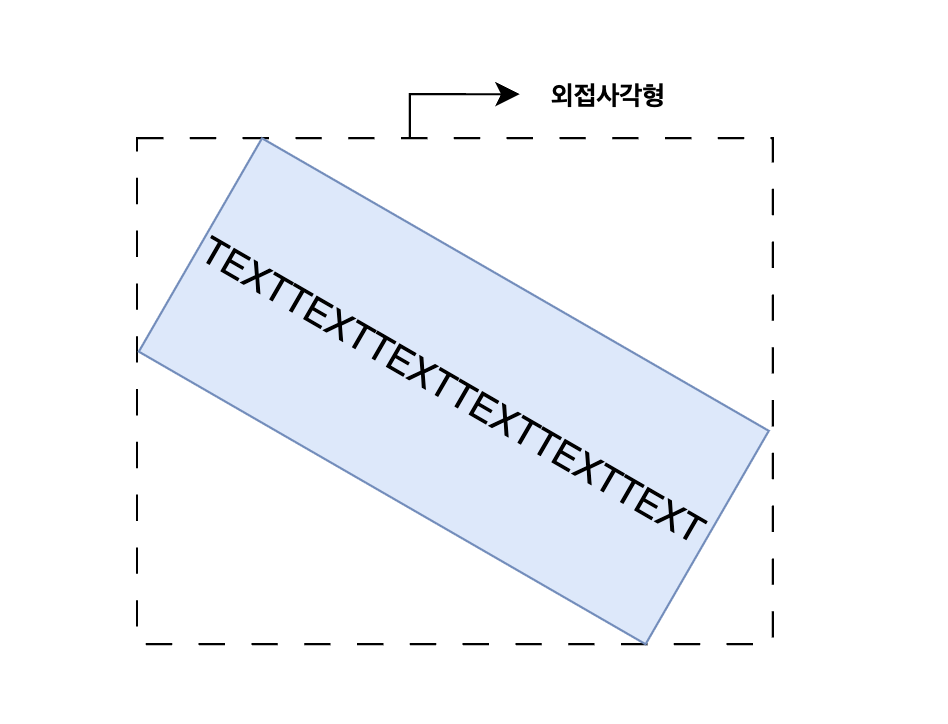
In other words, what we were getting back wasn't the original element's pre-rotation size, but the size of the smallest rectangle that could enclose the element after rotation (the bounding rectangle).
The text inside the rotated shape was rotating just fine along with the shape, but the caret has to be drawn separately, and we were positioning it based on the bounding rectangle of the rotated text. As a result, the caret was rendered in a completely wrong place.
The existing coordinate logic couldn't fix this.
In the end, to rotate and draw the caret along with the shape, we had to figure out the coordinates, width, and height of the text element in its rotated state.
What I had to work with...
Here's the information I had available. I needed to use this to draw the caret at the correct position even after rotation.
- The rotated text element's bounding rectangle coordinates, width, and height
- The rotation angle (θ)
- The browser-provided caret's bounding rectangle coordinates, width, and height
Using this, I had to make sure the caret would be drawn in the right place even when rotated.
- Use trigonometric functions (sin, cos) to convert coordinates before and after rotation
- Use the distance from a point to a line formula to compute the relative coordinates inside the text
-
Find the actual width and height of the text element before rotation
-
Find the top-left and bottom-left vertex coordinates of the text after rotation
-
Correct the actual caret position based on the browser-provided caret
-
Use the line equation and distance formula to get the caret's relative position Compute the distance between the caret coordinate and the left boundary line from step (2) → Figure out where inside the text the caret should be placed
The solution
1. Find the actual width and height of the text element before rotation
Using the rotated text element's bounding rectangle (W, H) and the rotation angle (θ),
I recover the actual width and height of the pre-rotation text (= the original text) with trigonometric functions.

function getOriginalTextElement(rotate, boundingRect, cos, sin) {
  const W = boundingRect.width;   // width of the rotated text element's bounding rectangle
  const H = boundingRect.height;  // height of the rotated text element's bounding rectangle

  // w: original width, h: original height
  // W = w * |cos(θ)| + h * |sin(θ)|  (width of the bounding rectangle)
  // H = w * |sin(θ)| + h * |cos(θ)|  (height of the bounding rectangle)

  // Solving the system of equations:
  // W = w * cos + h * sin  ... (1)
  // H = w * sin + h * cos  ... (2)
  //
  // (1) + (2): W + H = (w + h) * (cos + sin)
  // (1) - (2): W - H = (w - h) * (cos - sin)
  //
  // Therefore:
  // w + h = (W + H) / (cos + sin)
  // w - h = (W - H) / (cos - sin)
  //
  // And finally:
  // w = [(W + H) / (cos + sin) + (W - H) / (cos - sin)] / 2
  // h = [(W + H) / (cos + sin) - (W - H) / (cos - sin)] / 2

  // Account for the signs of cos and sin in each quadrant
  if (rotate < 90) {
    // 0° ≤ θ < 90°: cos > 0, sin > 0
    const w = ((W + H) / (cos + sin) + (W - H) / (cos - sin)) / 2;
    const h = ((W + H) / (cos + sin) - (W - H) / (cos - sin)) / 2;
    return { width: w, height: h };
  }
  if (rotate < 180) {
  }
  if (rotate < 270) {
  }
  if (rotate < 360) {
  }
}
I recovered the original text's size (w, h) using trigonometric functions and a system of equations.
2. Find the top-left and bottom-left vertex coordinates of the text after rotation
Using the original text's width/height (w, h), the bounding rectangle coordinates (X, Y), and the rotation angle (θ) computed above, I use trigonometric functions to calculate the top-left or bottom-left vertex coordinates of the rotated text.
function getTopLeftVertex(rotate, originalTextElement, cos, sin, boundingRect) {
  const X = boundingRect.left;
  const Y = boundingRect.top;
  const W = boundingRect.width;
  const H = boundingRect.height;
  const w = originalTextElement.width;
  const h = originalTextElement.height;

  if (rotate < 90) {
    return { x: X + h * sin, y: Y };
  }
  // Handle the other quadrants
}
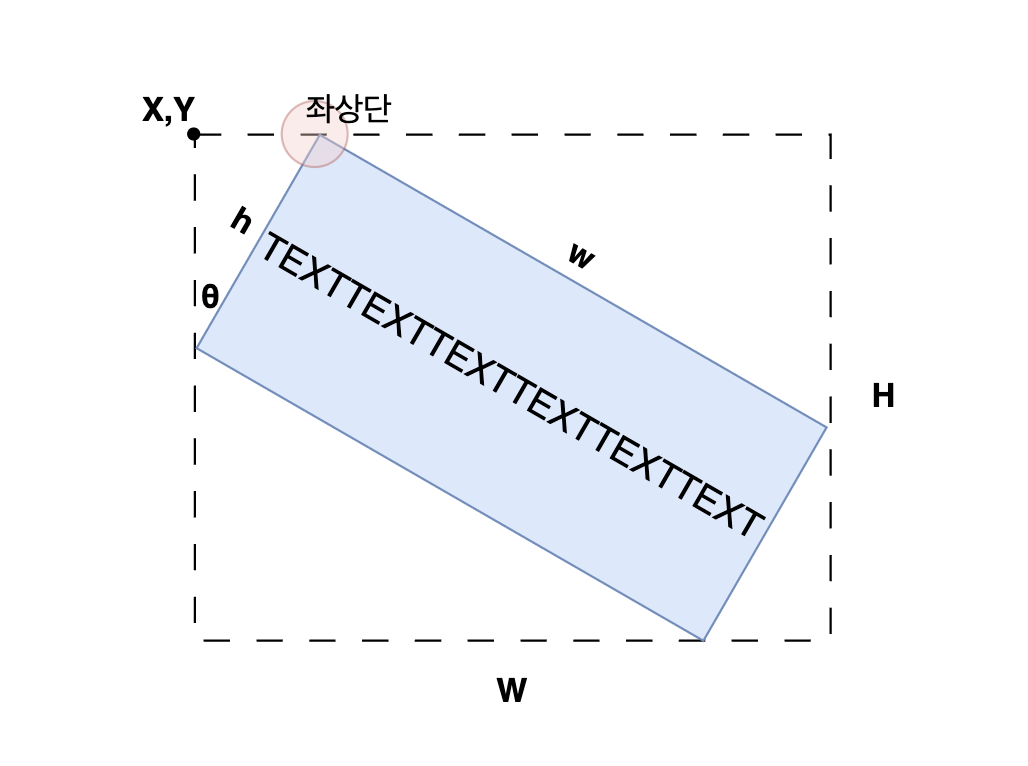
When rotate < 90, the top-left vertex is the point shifted h * sin(θ) to the right from the bounding rectangle's left edge.
3. Correct the actual caret position based on the browser-provided caret
The browser-provided caret is also given to us as a bounding rectangle in its rotated state, so we need to use trigonometric functions to correct the caret's top coordinate based on this value.
function getRotatedCaretTop(rotate, browserCaret, cos, sin) {
  const X = browserCaret.left;
  const Y = browserCaret.top;
  const W = browserCaret.width;
  const H = browserCaret.height;

  // 1. Find the browser caret's reference point (Bottom) in the rotated state
  let rotatedCaretBottom;
  if (rotate < 90) {
    rotatedCaretBottom = { x: X, y: Y + H };
  } else {
    // Other quadrants
  }

  // 2. Shift by the browser caret's height to compute the Top coordinate
  let rotatedCaretTop;
  if (rotate < 90) {
    rotatedCaretTop = {
      x: rotatedCaretBottom.x + H * sin,
      y: rotatedCaretBottom.y - H * cos
    };
  } else {
    // Other quadrants
  }
  return rotatedCaretTop;
}
4. Use the line equation and distance formula to get the caret's relative position
To draw the caret accurately inside the rotated text element, we need to compute its relative position within the text based on its absolute coordinates.
To do this, we treat the rotated text element's left boundary as a straight line, and use the distance from a point to a line formula to compute how far the caret is from that line.
function getCaretRelativePosition(rotate, caretTopCoord, topLeftVertex, bottomLeftVertex) {
  // topLeftVertex, bottomLeftVertex: the two points that form the left boundary of the rotated shape
  // caretTopCoord: the top coordinate of the rotated caret

  // Step 1: derive the line equation from the two points
  // General form of a line: ax + by + c = 0
  const a = bottomLeftVertex.y - topLeftVertex.y;  // y2 - y1
  const b = topLeftVertex.x - bottomLeftVertex.x;  // x1 - x2 (note: order is swapped)
  const c = bottomLeftVertex.x * topLeftVertex.y - topLeftVertex.x * bottomLeftVertex.y;

  // Step 2: apply the distance-from-point-to-line formula
  // distance = |ax₀ + by₀ + c| / √(a² + b²)
  const numerator = Math.abs(a * caretTopCoord.x + b * caretTopCoord.y + c);
  const denominator = Math.sqrt(a * a + b * b);
  const distance = numerator / denominator;

  if (rotate < 90) {
    return distance
  }
  // Other quadrants
}
Applying this distance value relative to the text element lets us calculate exactly where the caret should be drawn inside it.
What about 45°, 135°, 225°, and 315°?
The denominator of the system used to recover the original dimensions is cos²θ - sin²θ, or cos(2θ). It becomes zero at 45°, 135°, 225°, and 315°.
At 45°, for example, both dimensions of the bounding rectangle equal (w + h) / √2. Different combinations of w and h can therefore produce the same bounding rectangle, so the original dimensions cannot be uniquely recovered from the bounding rectangle and rotation angle alone.
When the denominator is close to zero, the calculation should stop. The implementation needs either the dimensions saved before rotation or some other source of additional information.
const denom = cos * cos - sin * sin;

if (Math.abs(denom) < 1e-9) {
  return null;
}
So, do you need math for development?
I was able to solve the caret positioning issue with math I'd learned in high school.
Bumping up against the limits of what the DOM API can do — and realizing some problems can only be solved by computing things yourself — really drove the point home.
Of course, "you can be a developer even if you're bad at math" isn't wrong. Most day-to-day development work really can be done without math.
But if you want to build more refined, more polished products — when you're up against tricky UI problems, performance optimization, or implementing algorithms — mathematical thinking is undeniably a powerful weapon.
What I learned from this experience is that math isn't a prerequisite for development, but it can be a powerful tool for producing better results.